
Open in Desktop App
Use the File Menu
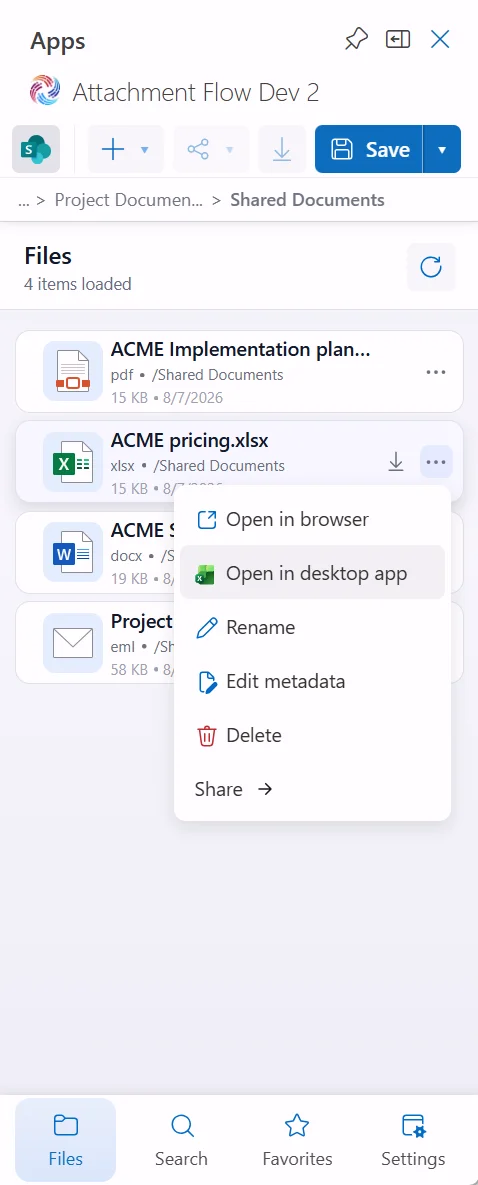
Open a file row menu and choose Open in desktop app. Attachment Flow uses one of two desktop-open methods depending on the file type.
The Open in desktop app menu item appears only for files that Attachment Flow can route to one of these desktop-open methods.
Word, Excel, and PowerPoint Files
Files ending in .doc, .docx, .xls, .xlsx, .ppt, or .pptx are opened with Microsoft Office desktop URI schemes.
The matching Office desktop application must be installed on the computer. For example, Word is required for Word documents, Excel is required for spreadsheets, and PowerPoint is required for presentations.
Admin tip: Trusted sites
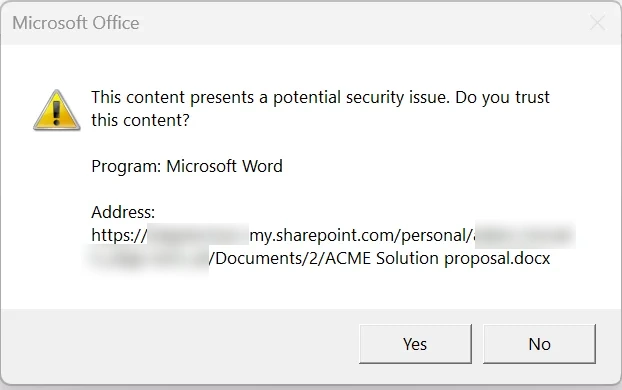
Windows may show a Microsoft Office security prompt when a user opens a SharePoint or OneDrive document in the desktop app.
For a smoother user experience, admins can add the relevant SharePoint or OneDrive site URL to the Windows Trusted sites zone. After the site is trusted, users are less likely to see this confirmation prompt when opening Office files from Attachment Flow.
Other File Types
Other files from OneDrive, SharePoint, or Teams are opened through the OneDrive sync desktop protocol.
The OneDrive sync application must be installed and configured on the computer. If Microsoft 365 cannot provide the desktop-open metadata for the selected file, Attachment Flow shows an error instead of opening the file.